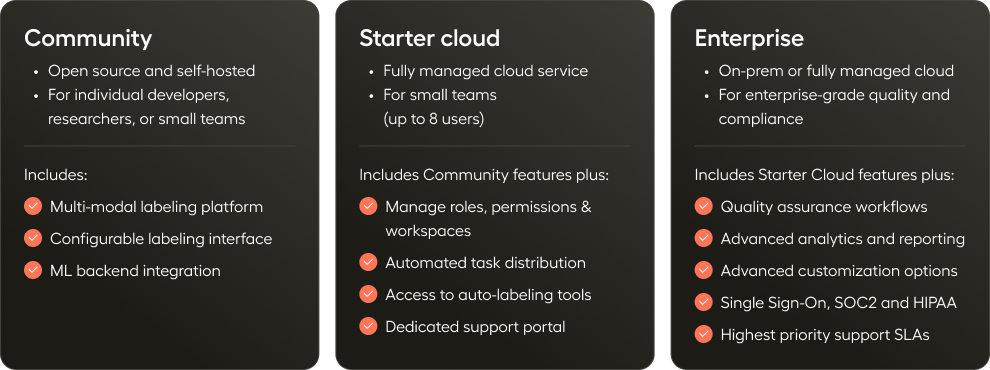
Label Studio is available to everyone as open source software (Label Studio Community Edition). There are also two paid editions: Starter Cloud and Enterprise.
| Functionality |
Community |
Starter Cloud |
Enterprise |
| User Management |
Role-based workflows
Role-based automated workflows for annotators and reviewers. |
❌ |
Limited |
✅ |
Role-based access control
Role-based access control into workspaces and projects: Admin, Manager, Reviewer, and Annotator. |
❌ |
✅ |
✅ |
Customizable permissions
Fine-grained control over which roles can execute specific actions, such as inviting members, managing cloud storage, deleting tasks, and more. |
❌ |
❌ |
✅ |
| Data Management |
Data management view
View and manage datasets and tasks in a project through the Data Manager view. |
✅ |
✅ |
✅ |
Multiple data formats
Label any data type from text, images, audio, video, time series data to multimodality. |
✅ |
✅ |
✅ |
Import data
Reference data stored in your database, cloud storage buckets, or local storage and label it in the browser. |
✅ |
✅ |
✅ |
Advanced cloud storage integrations
Databricks Unity Catalog, IAM for AWS S3, Azure Blob Storage with Service Principal, and WIF for Google Cloud Storage connections. |
❌ |
❌ |
✅ |
Import pre-annotated data
Import pre-annotated data (predictions) into Label Studio for further refinement and assessment. |
✅ |
✅ |
✅ |
Export data
Export annotations as common formats like JSON, COCO, Pascal VOC and others. |
✅ |
✅ |
✅ |
Sync data
Synchronize new and labeled data between projects and your external data storage. |
✅ |
✅ |
✅ |
Chat
Generate and label conversation data. Interact live with an LLM of your choice. |
❌ |
Limited |
✅ |
| Project Management |
Organize data in projects
Projects to manage data labeling activities. |
✅ |
✅ |
✅ |
Organize projects in workspaces
Organizes related projects by team, department, or product. Users can only access workspaces they associated with. |
❌ |
❌ |
✅ |
Personal sandbox workspace
Personal sandbox workspace for project testing and experimentation. |
❌ |
✅ |
✅ |
Templates
Templates to set up data labeling projects faster. |
✅ |
✅ |
✅ |
AI assistant
Use an LLM trained by HumanSignal to help you create and refine templates. |
❌ |
✅ |
✅ |
Project membership
Only users who are added as members to a project can view it. |
❌ |
✅ |
✅ |
Project-level roles
Annotator and Reviewer can be assigned to Annotator/Reviewer roles at a per-project level. |
❌ |
✅ |
✅ |
Project-level user settings
Multiple configuration options for how Annotators and Reviewers interact with tasks and what information they can see. |
❌ |
Limited |
✅ |
| Data Labeling Workflows |
Assign tasks
Assign tasks to certain annotators or reviewers. |
❌ |
✅ |
✅ |
Automatically assign tasks
Set rules and automate how tasks are distributed to annotators. |
❌ |
✅ |
✅ |
Simplified interface for Annotators
Annotator-specific labeling view that only shows assigned tasks. |
❌ |
✅ |
✅ |
Bulk labeling
Classify data in batches. |
❌ |
❌ |
✅ |
| Customization & Development |
Programmable & embeddable interfaces
Build fully customized labeling and evaluation interfaces with React. Embed into your own applications. |
❌ |
❌ |
✅ |
Tag library
Use our tag library to customize the labeling interface by modifying pre-built templates or by building your own templates. |
✅ |
✅ |
✅ |
White labeling
Use your company colors and logo to give your team a consistent experience. (Additional cost) |
❌ |
❌ |
✅ |
Plugins
Use JavaScript to further enhance and customize your labeling interface. |
❌ |
❌ |
✅ |
API/SDK & webhooks
APIs, SDK, and webhooks for programmatically accessing and managing Label Studio. |
✅ |
✅ |
✅ |
| Prompts |
Automated pre-labeling
Rapidly pre-label tasks using LLMs. |
❌ |
Limited Trial |
✅ |
LLM fine-tuning and evaluation
Evaluate and fine-tune LLM prompts against a ground truth dataset. |
❌ |
Limited Trial |
✅ |
Run benchmarks
Compare model outputs against ground truth or rubric criteria. |
❌ |
Limited Trial |
✅ |
| Machine Learning |
Custom ML backends
Connect a machine learning model to the backend of a project. |
✅ |
✅ |
✅ |
Active learning loops
Accelerate labeling with active learning loops. |
❌ |
❌ |
✅ |
Predictions from connected models
Automatically label and sort tasks by prediction score with the ML model backend. |
✅ |
✅ |
✅ |
| Analytics and Reporting |
Project dashboards
Dashboards for monitoring project progress. |
❌ |
❌ |
✅ |
Annotator performance dashboards
Dashboards to review and monitor individual annotator performance. |
❌ |
❌ |
✅ |
Activity logs
Activity logs for auditing annotation activity by project. |
❌ |
❌ |
✅ |
Annotation history
View annotation history from the labeling interface. |
❌ |
✅ |
✅ |
| Quality Workflows |
Assign reviewers
Assign reviewers to review, fix and update annotations. |
❌ |
✅ |
✅ |
Automatic task reassignment
Reassign tasks with low agreement scores to new annotators. |
❌ |
❌ |
✅ |
Agreement metrics
Define how annotator consensus is calculated using pre-defined agreement metrics. |
❌ |
Limited |
✅ |
Custom agreement metrics
Write your own custom agreement metric. |
❌ |
❌ |
✅ |
Comments and notifications
Team collaboration features like comments and notifications on annotation tasks. |
❌ |
✅ |
✅ |
Identify ground truths
Mark which annotations should be included in a Ground Truth dataset. |
❌ |
✅ |
✅ |
Overlap configuration
Set how many annotators must label each sample. |
❌ |
✅ |
✅ |
Pause annotators
Pause an individual annotator's progress manually or based on pre-defined behaviors. |
❌ |
❌ |
✅ |
Annotation limits
Set a limit on how many annotations a user can submit within a project before their work is paused. |
❌ |
❌ |
✅ |
Annotator consensus matrices
Matrices used to compare labeling results by different annotators. |
❌ |
❌ |
✅ |
Label distribution charts
Identify possible problems with your dataset distribution, such as an unbalanced dataset. |
❌ |
❌ |
✅ |
| Security and Support |
SSO
Secure access and authentication of users via SAML SSO or LDAP. |
❌ |
❌ |
✅ |
SOC2
SOC2-compliant hosted cloud service or on-premise availability |
❌ |
❌ |
✅ |
Support portal
Access to a dedicated support portal. |
❌ |
✅ |
✅ |
Uptime SLA
99.9% uptime SLA |
❌ |
❌ |
✅ |
Customer Success Manager
Dedicated customer success manager to support onboarding, education, and escalations. |
❌ |
❌ |
✅ |